> ## Documentation Index
> Fetch the complete documentation index at: https://docs.pubrio.com/llms.txt
> Use this file to discover all available pages before exploring further.
# Engage & Close
> Everything you need to build and close pipeline.
# From Data to Deal
Building pipeline isn't just about finding the right lead; it's about executing the right workflow.
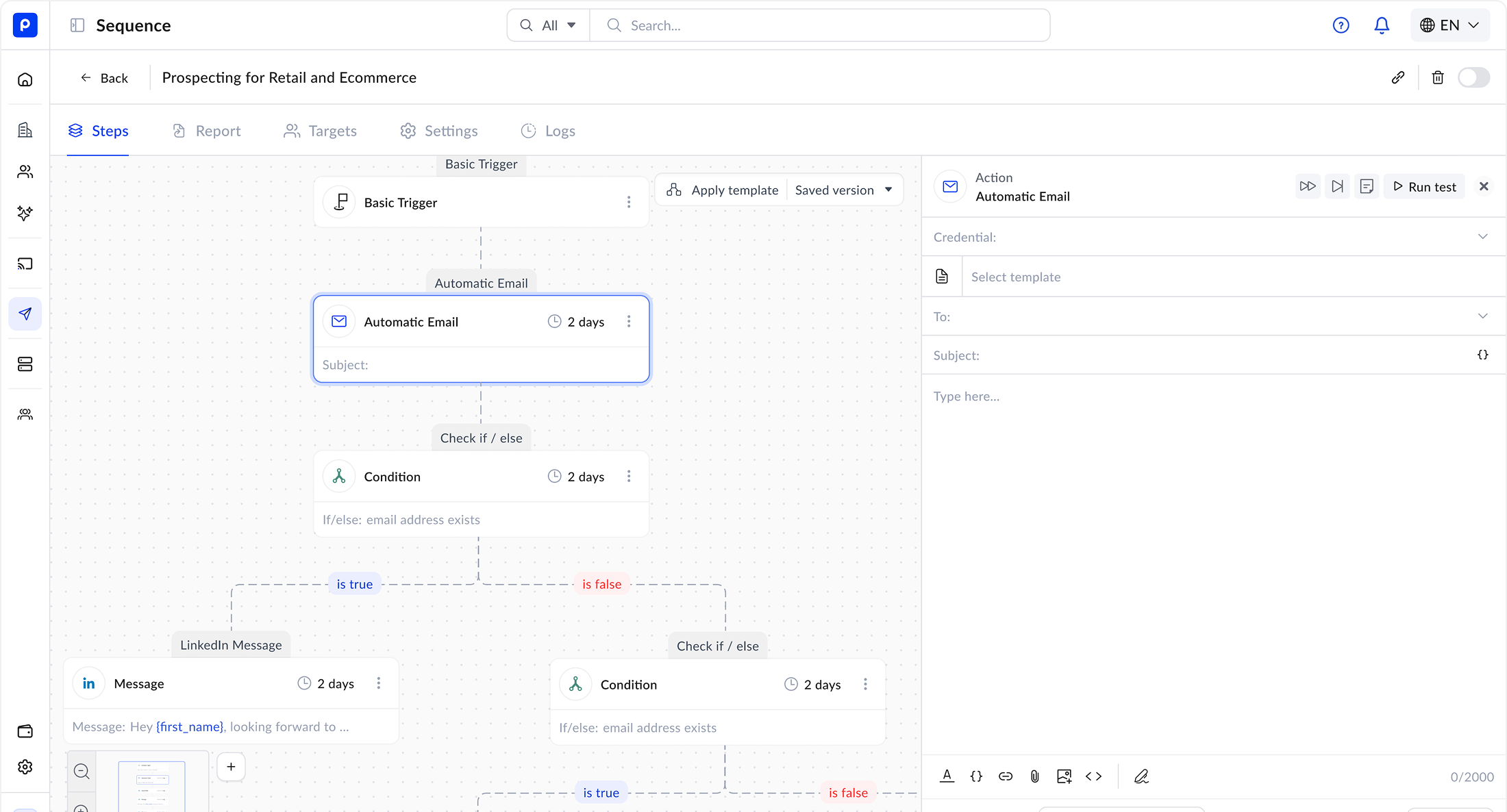
Pubrio’s **Engage & Close** module is a built-in Sequence Engine that sits directly on top of your Data Layer. Because the data and the sending infrastructure are unified, you can move from "Enrichment" to "Execution" in a single click, ensuring your outreach is always powered by the most up-to-date prospect information. And because timing is the whole game, you can launch the moment an account makes its move — a new market, a new hire — while the window is still open.
 ## The "Data-First" Workflow
Most sales teams lose time exporting CSVs from a database and importing them into a separate sending tool. Pubrio eliminates the friction.
**No More CSV Hell.**
Push contacts directly from "Find Leads" or "Enrich CRM" into a Sequence. All the rich data travels with them automatically.
**Flexible Personalization.**
If you have the data, you can use it. Upload any column (e.g., `Event_City`, `Previous_Job`) and map it to a **Custom Variable** in your template.
* *Usage:* "I saw you were at `{{Event_Name}}` in `{{Event_City}}` last week."
***
## Capabilities
### 1. Multi-Channel Sequences
Orchestrate a complete outreach strategy across multiple touchpoints.
* **Email:** Send automated, personalized emails.
* **LinkedIn:** Automate connection requests and messages (via supported integrations).
* **Manual Tasks:** Create "Call Tasks" for your SDRs when a high-value prospect opens an email 3 times.
### 2. The Sequence Builder
Design linear or branching workflows to nurture your prospects.
* **Steps & Delays:** "Send Email 1 -> Wait 2 Days -> Send Email 2."
* **A/B Testing:** Test different subject lines or value propositions to see what resonates with specific global markets.
* **Templates:** Save your best-performing messages to the **Templates** library and share them across your team.
### 3. Deliverability Infrastructure
We handle the technical heavy lifting to ensure your emails land in the Primary Inbox, not Spam.
* **Inbox Rotation:** Connect multiple sending accounts (e.g., `alex@`, `alex.s@`) and rotate traffic between them to keep volume safe.
* **Bounce Protection:** We verify email validity *before* sending. If a contact's data has decayed since you added them, we skip the email to protect your domain reputation.
***
## Flexible Design Editors
Choose the right canvas for your message. Whether you need a simple text email or a brand-heavy HTML newsletter, we support your workflow.
**Best for: Sales Emails & Quick Nurture.**
Use our built-in Notion-style editor to draft clean, high-converting emails.
* **Features:**
* Drag-and-drop images and text blocks.
* Insert **Custom Variables** via a simple dropdown menu.
* "Check for Spam Words" built-in analysis.
**Best for: Newsletters & Marketing Campaigns.**
Need pixel-perfect HTML? Design in **Stripo** and sync it to Pubrio.
* **Workflow:**
1. Design a responsive template in Stripo.
2. Click "Export to Pubrio."
3. The design appears instantly in your **Templates** folder, ready to use in any Sequence.
***
## Use Cases
### The "Event Follow-Up"
**Goal:** Engage attendees after a conference.
1. **Import:** Upload a CSV of attendees with a custom column: `Booth_Topic`.
2. **Sequence:** Enroll them in a "Post-Event Nurture."
3. **Content:** *"Great meeting you! You mentioned being interested in `{{Booth_Topic}}`. Here is a case study regarding that..."*
### The "Expansion Trigger"
**Goal:** Reach an account the moment it enters a new market.
1. **Enrich:** Filter your CRM for accounts with a fresh **market-move signal** — a new office, a new entity, or a localized hiring push.
2. **Sequence:** Auto-enroll them in a "New-Market Welcome" flow the day the signal fires.
3. **Content:** Use a Stripo-designed template that references their specific move and your local case studies.
***
## Ready to Close?
**Go to Platform.**
Build your first multi-channel workflow.
**Need Calendar Sync?**
We are actively building calendar booking and other CRM features. Let us know what you need next.
## The "Data-First" Workflow
Most sales teams lose time exporting CSVs from a database and importing them into a separate sending tool. Pubrio eliminates the friction.
**No More CSV Hell.**
Push contacts directly from "Find Leads" or "Enrich CRM" into a Sequence. All the rich data travels with them automatically.
**Flexible Personalization.**
If you have the data, you can use it. Upload any column (e.g., `Event_City`, `Previous_Job`) and map it to a **Custom Variable** in your template.
* *Usage:* "I saw you were at `{{Event_Name}}` in `{{Event_City}}` last week."
***
## Capabilities
### 1. Multi-Channel Sequences
Orchestrate a complete outreach strategy across multiple touchpoints.
* **Email:** Send automated, personalized emails.
* **LinkedIn:** Automate connection requests and messages (via supported integrations).
* **Manual Tasks:** Create "Call Tasks" for your SDRs when a high-value prospect opens an email 3 times.
### 2. The Sequence Builder
Design linear or branching workflows to nurture your prospects.
* **Steps & Delays:** "Send Email 1 -> Wait 2 Days -> Send Email 2."
* **A/B Testing:** Test different subject lines or value propositions to see what resonates with specific global markets.
* **Templates:** Save your best-performing messages to the **Templates** library and share them across your team.
### 3. Deliverability Infrastructure
We handle the technical heavy lifting to ensure your emails land in the Primary Inbox, not Spam.
* **Inbox Rotation:** Connect multiple sending accounts (e.g., `alex@`, `alex.s@`) and rotate traffic between them to keep volume safe.
* **Bounce Protection:** We verify email validity *before* sending. If a contact's data has decayed since you added them, we skip the email to protect your domain reputation.
***
## Flexible Design Editors
Choose the right canvas for your message. Whether you need a simple text email or a brand-heavy HTML newsletter, we support your workflow.
**Best for: Sales Emails & Quick Nurture.**
Use our built-in Notion-style editor to draft clean, high-converting emails.
* **Features:**
* Drag-and-drop images and text blocks.
* Insert **Custom Variables** via a simple dropdown menu.
* "Check for Spam Words" built-in analysis.
**Best for: Newsletters & Marketing Campaigns.**
Need pixel-perfect HTML? Design in **Stripo** and sync it to Pubrio.
* **Workflow:**
1. Design a responsive template in Stripo.
2. Click "Export to Pubrio."
3. The design appears instantly in your **Templates** folder, ready to use in any Sequence.
***
## Use Cases
### The "Event Follow-Up"
**Goal:** Engage attendees after a conference.
1. **Import:** Upload a CSV of attendees with a custom column: `Booth_Topic`.
2. **Sequence:** Enroll them in a "Post-Event Nurture."
3. **Content:** *"Great meeting you! You mentioned being interested in `{{Booth_Topic}}`. Here is a case study regarding that..."*
### The "Expansion Trigger"
**Goal:** Reach an account the moment it enters a new market.
1. **Enrich:** Filter your CRM for accounts with a fresh **market-move signal** — a new office, a new entity, or a localized hiring push.
2. **Sequence:** Auto-enroll them in a "New-Market Welcome" flow the day the signal fires.
3. **Content:** Use a Stripo-designed template that references their specific move and your local case studies.
***
## Ready to Close?
**Go to Platform.**
Build your first multi-channel workflow.
**Need Calendar Sync?**
We are actively building calendar booking and other CRM features. Let us know what you need next.