> ## Documentation Index
> Fetch the complete documentation index at: https://docs.pubrio.com/llms.txt
> Use this file to discover all available pages before exploring further.
# Personalizing Your Sequences
> Deep dive into personalization features in Pubrio sequences to maximize engagement and relevance.
Personalization is the cornerstone of successful outreach. Pubrio sequences offer multiple powerful controls to tailor your messages and engagement to each prospect’s unique data and context.
## Variables Based on Target Data
Variables are dynamic placeholders that pull information directly from the target record. Common examples include name, company name, position, or custom fields.
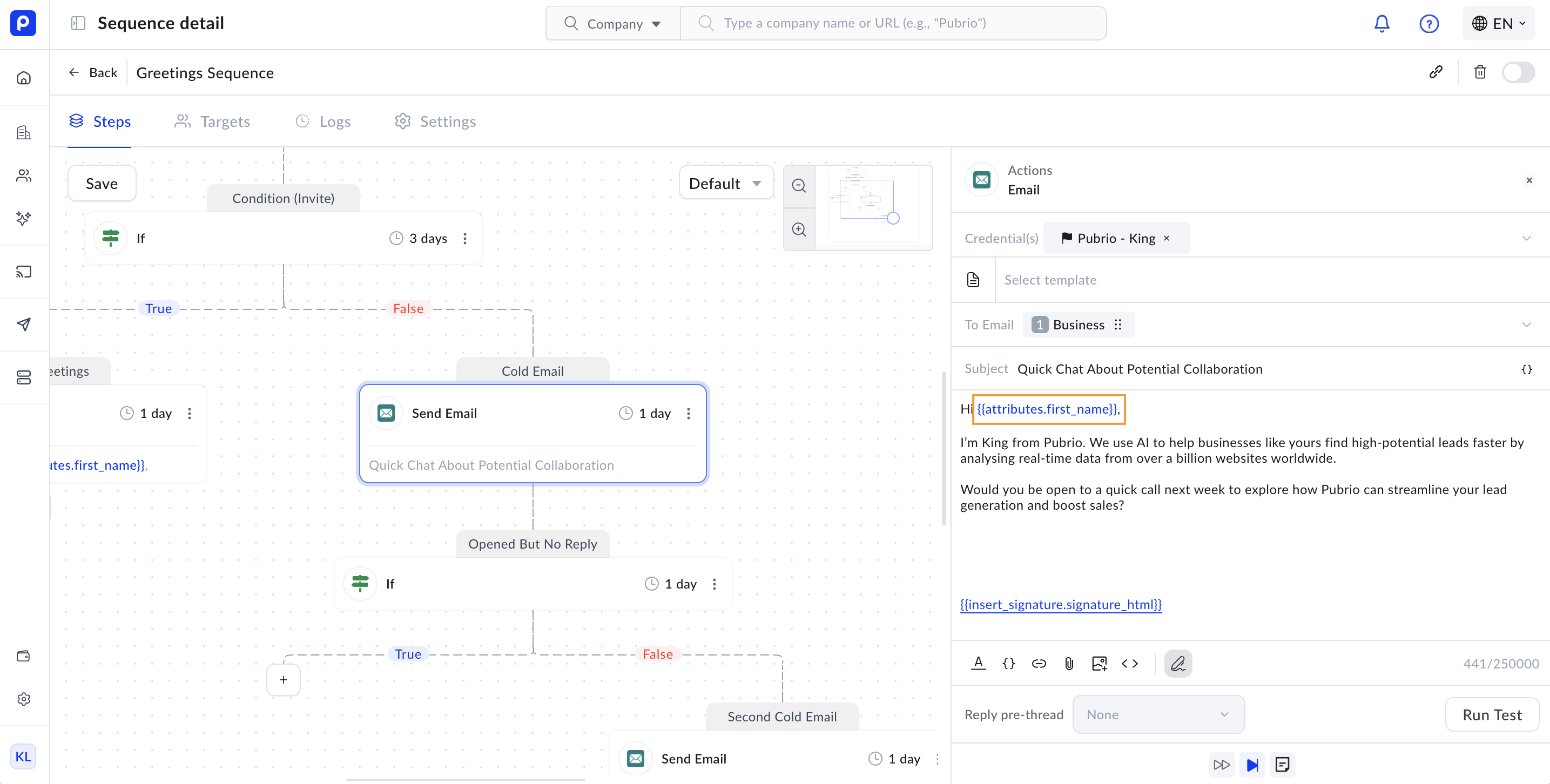 * When composing messages in your sequence steps, you can insert these variables from a comprehensive variable list.
* This allows each message to feel personal and relevant without manual editing.
* For example, using `{{attributes.first_name}}` will automatically insert the recipient’s first name.
* Variables update in real-time based on the most current contact data, ensuring accuracy.
* When composing messages in your sequence steps, you can insert these variables from a comprehensive variable list.
* This allows each message to feel personal and relevant without manual editing.
* For example, using `{{attributes.first_name}}` will automatically insert the recipient’s first name.
* Variables update in real-time based on the most current contact data, ensuring accuracy.
 ## Contact Selection Type
Contact selection controls which contact information is used to send your outreach, and it varies by channel:
* **Email:**\
You can select from multiple email categories:
* **Business Email:** The professional email tied to the contact’s work.
* **Personal Email:** The contact’s personal email address.
* **Company Generic Email:** A general company address (e.g., [info@company.com](mailto:info@company.com)) used as a fallback.
* **SMS and Other Channels:**\
Similar logic applies to phone numbers or LinkedIn profiles, where you specify which contact field to use.
## Contact Selection Type
Contact selection controls which contact information is used to send your outreach, and it varies by channel:
* **Email:**\
You can select from multiple email categories:
* **Business Email:** The professional email tied to the contact’s work.
* **Personal Email:** The contact’s personal email address.
* **Company Generic Email:** A general company address (e.g., [info@company.com](mailto:info@company.com)) used as a fallback.
* **SMS and Other Channels:**\
Similar logic applies to phone numbers or LinkedIn profiles, where you specify which contact field to use.
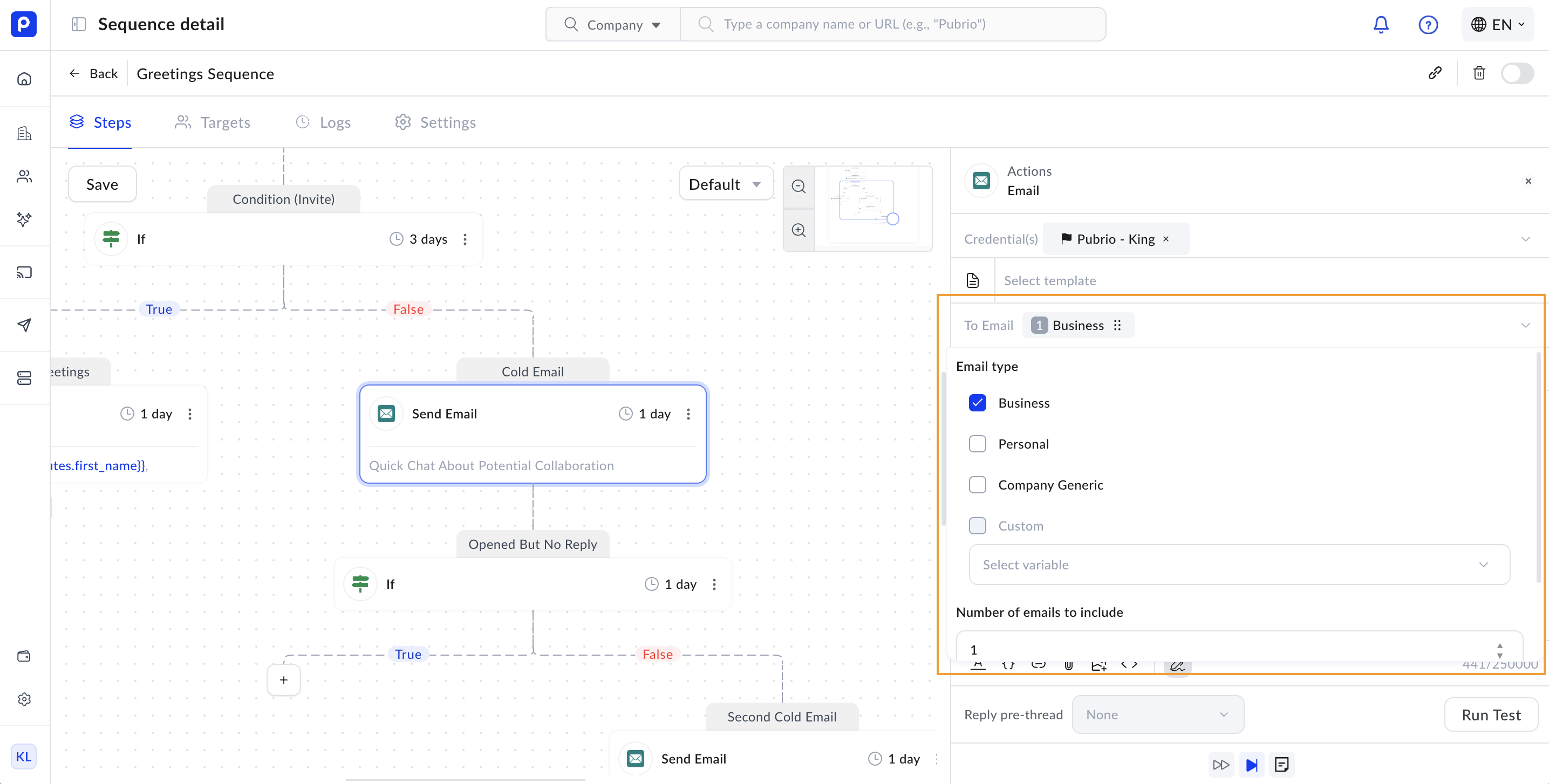 Pubrio follows the order you set to find the best available contact info. If the primary email is missing or unverified, it will try the next option.
> **Important:** Redeeming contact information before adding targets to sequences is highly recommended. This ensures you have verified, up-to-date contact data and can maximize multi-channel engagement.
## Sequence Credentials
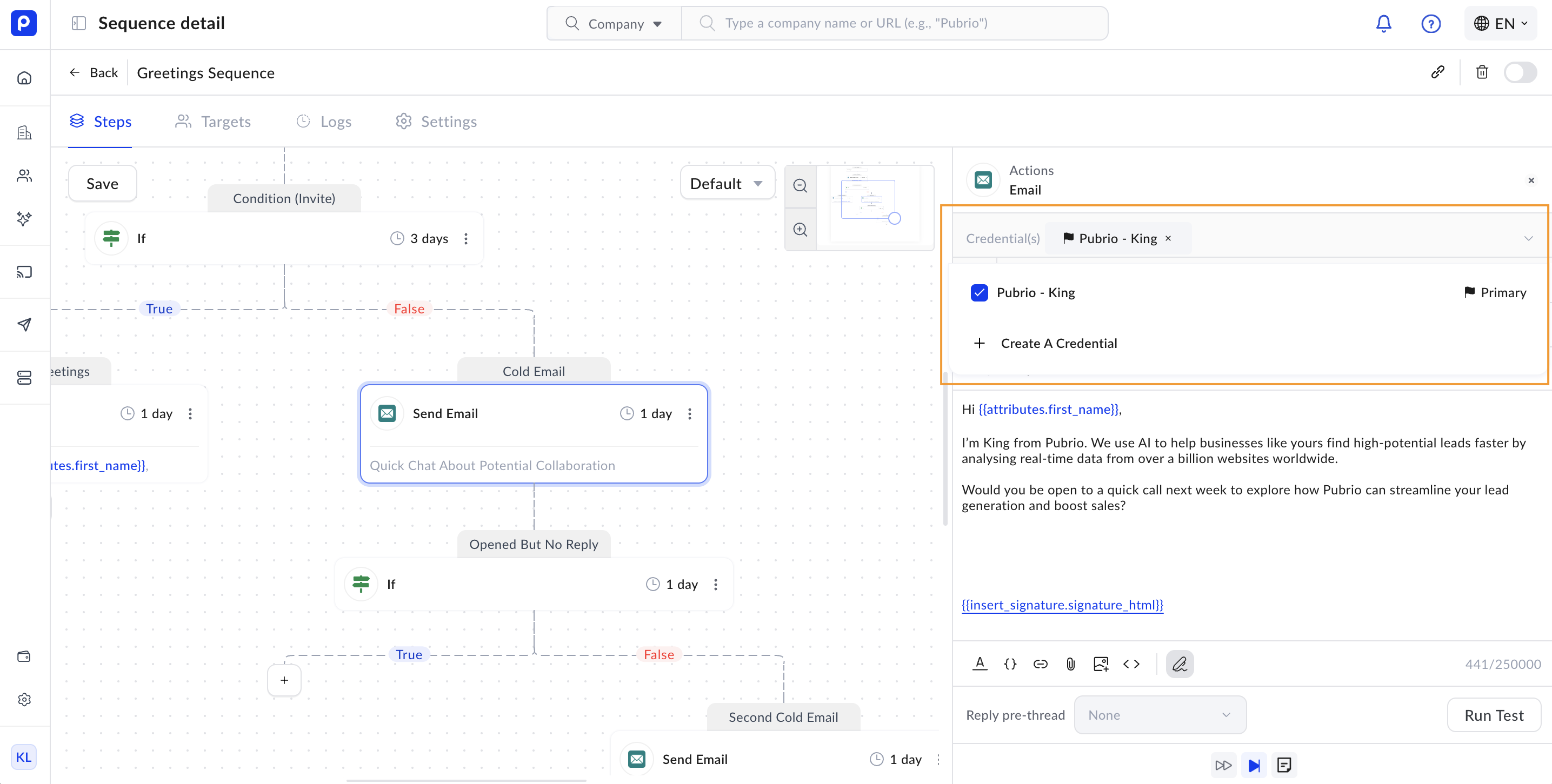
Credentials define which sending account or identity will be used for your outreach:
* You can add multiple credentials or aliases under a single account.
* This allows you to manage sending limits, distribute outreach volume, and tailor sender identities per use case.
* For example, you might use different credentials for different regions or product lines.
* Managing credentials properly helps maintain deliverability and avoid spam filters.
Pubrio follows the order you set to find the best available contact info. If the primary email is missing or unverified, it will try the next option.
> **Important:** Redeeming contact information before adding targets to sequences is highly recommended. This ensures you have verified, up-to-date contact data and can maximize multi-channel engagement.
## Sequence Credentials
Credentials define which sending account or identity will be used for your outreach:
* You can add multiple credentials or aliases under a single account.
* This allows you to manage sending limits, distribute outreach volume, and tailor sender identities per use case.
* For example, you might use different credentials for different regions or product lines.
* Managing credentials properly helps maintain deliverability and avoid spam filters.
 ## Sequence Signature
Email signatures help maintain brand consistency and professionalism in your outreach:
* Pubrio lets you add customizable signatures to your email actions.
* These signatures behave like those in standard email clients, including images, links, and formatted text.
* Consistent signatures build trust and reinforce your brand identity.
## Sequence Signature
Email signatures help maintain brand consistency and professionalism in your outreach:
* Pubrio lets you add customizable signatures to your email actions.
* These signatures behave like those in standard email clients, including images, links, and formatted text.
* Consistent signatures build trust and reinforce your brand identity.
 ## Code Editor for Advanced Personalization
For users who want rich, custom-designed content:
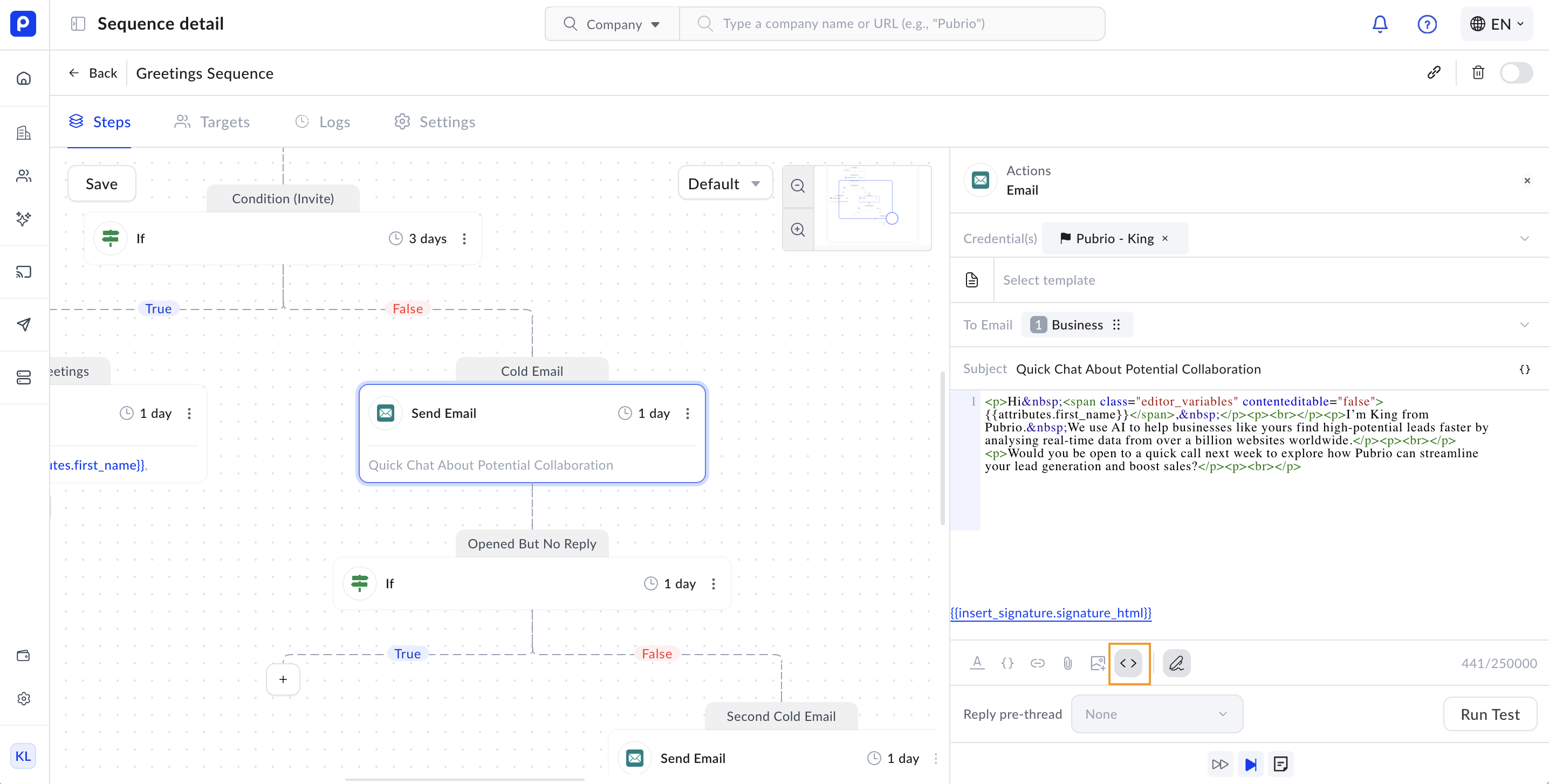
* Pubrio supports pasting HTML or code snippets exported from third-party design tools.
* The portal renders these in a pixel-perfect format, preserving your design fidelity.
* This feature enables advanced layouts, custom fonts, images, and interactive elements.
## Code Editor for Advanced Personalization
For users who want rich, custom-designed content:
* Pubrio supports pasting HTML or code snippets exported from third-party design tools.
* The portal renders these in a pixel-perfect format, preserving your design fidelity.
* This feature enables advanced layouts, custom fonts, images, and interactive elements.
 > **Note:** Ensure your HTML code is clean and tested for compatibility across clients.
## Testing Your Personalization Setup
Before launching your sequence, testing is critical to ensure personalization works as expected:
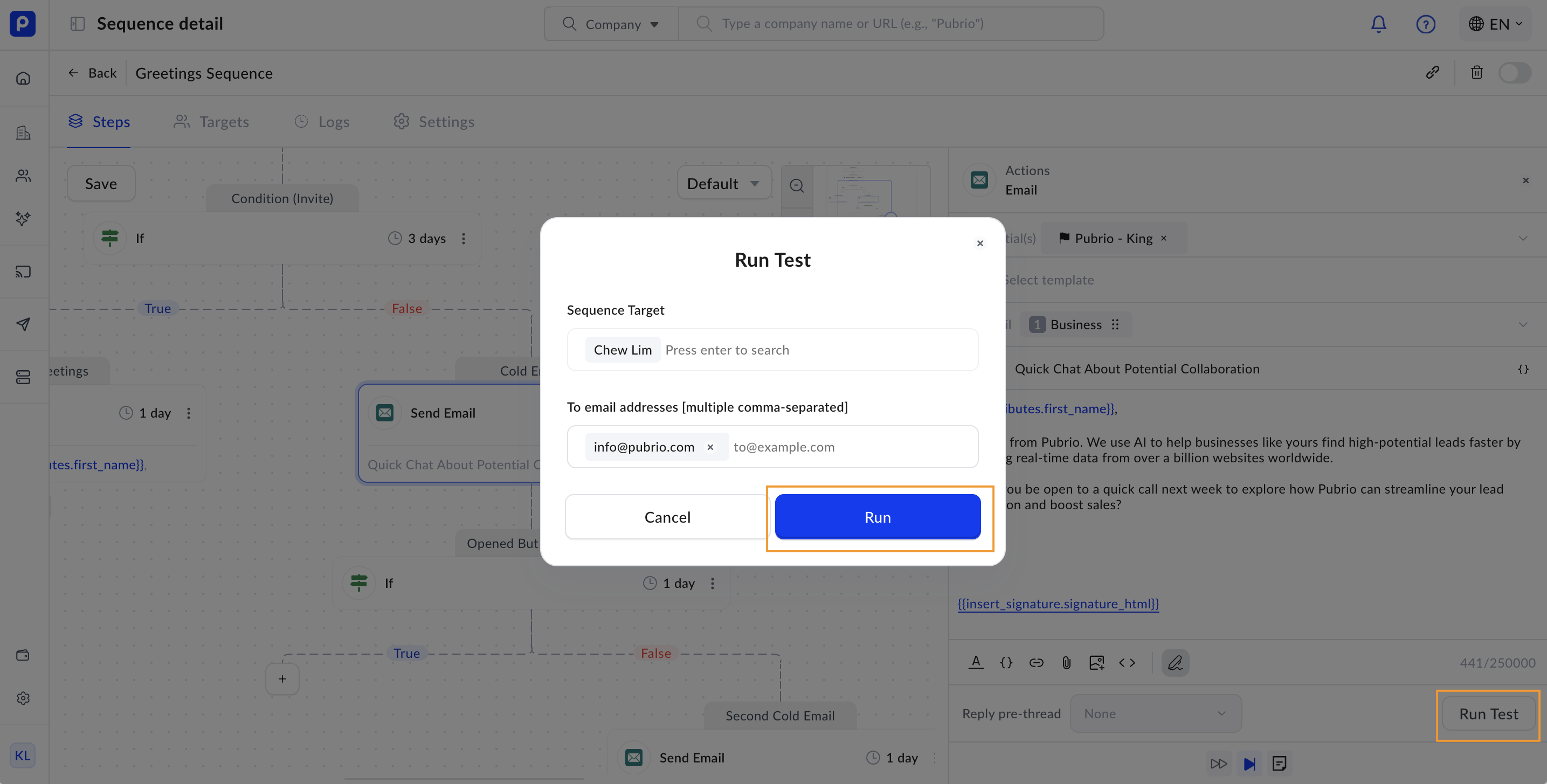
* Use the **Run Test** feature to preview how your message renders with real contact data.
* Select a target contact to simulate variable replacement and content rendering.
* You can also specify a destination channel to see the final output.
Running a test does not send an actual message to the sequence target; it is purely for previewing the personalization and delivery to your destination channel.
* Testing helps catch errors, missing variables, or formatting issues before live outreach.
> **Note:** Ensure your HTML code is clean and tested for compatibility across clients.
## Testing Your Personalization Setup
Before launching your sequence, testing is critical to ensure personalization works as expected:
* Use the **Run Test** feature to preview how your message renders with real contact data.
* Select a target contact to simulate variable replacement and content rendering.
* You can also specify a destination channel to see the final output.
Running a test does not send an actual message to the sequence target; it is purely for previewing the personalization and delivery to your destination channel.
* Testing helps catch errors, missing variables, or formatting issues before live outreach.
 By mastering these personalization controls—variables, contact selection, credentials, signatures, and testing—you can create highly relevant, professional, and effective outreach sequences that resonate with your prospects.