

From Data to Deal
Building pipeline isn’t just about finding the right lead; it’s about executing the right workflow. Pubrio’s Engage & Close module is a built-in Sequence Engine that sits directly on top of your Data Layer. Because the data and the sending infrastructure are unified, you can move from “Enrichment” to “Execution” in a single click, ensuring your outreach is always powered by the most up-to-date prospect information. And because timing is the whole game, you can launch the moment an account makes its move — a new market, a new hire — while the window is still open.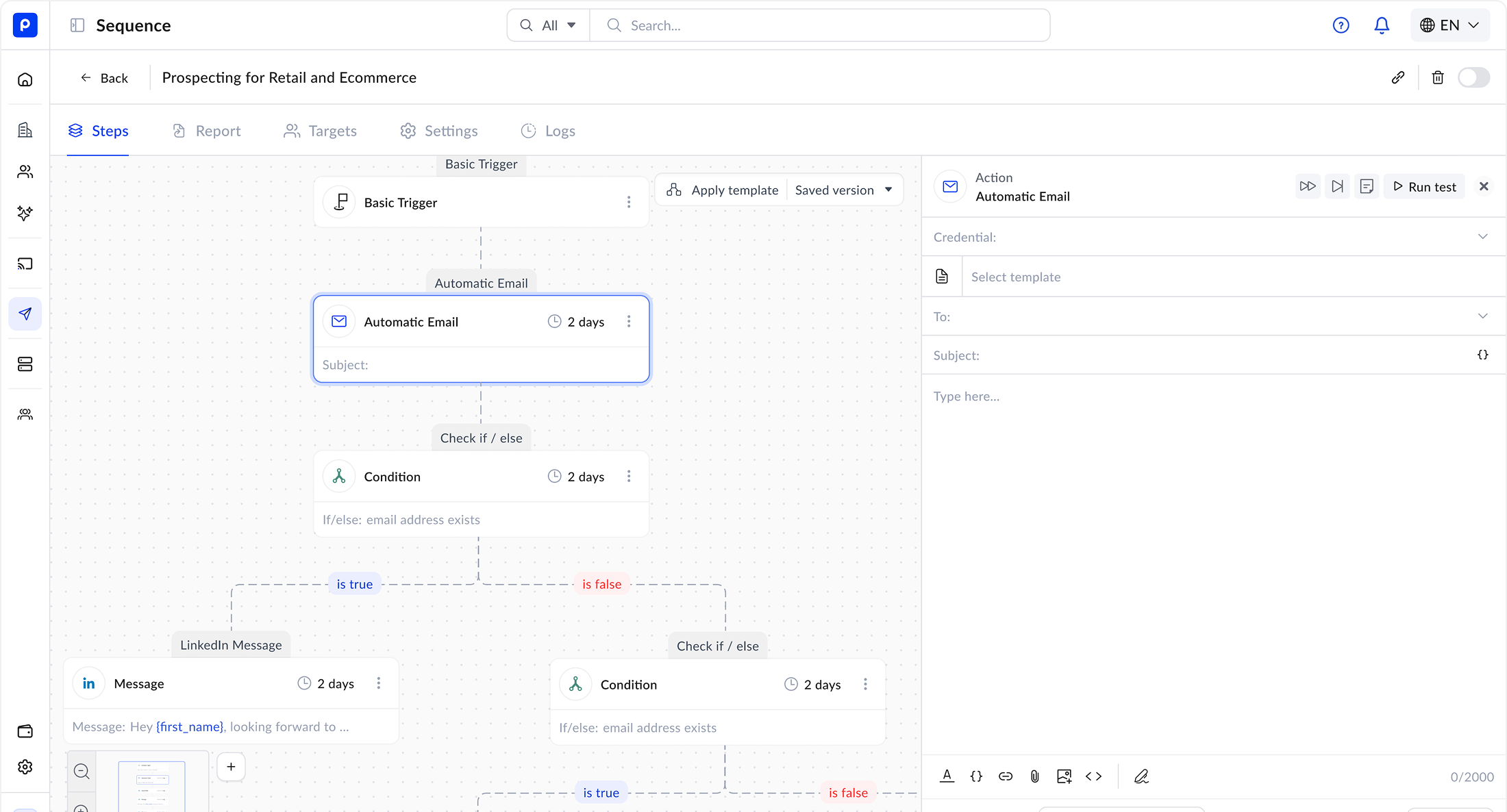
The “Data-First” Workflow
Most sales teams lose time exporting CSVs from a database and importing them into a separate sending tool. Pubrio eliminates the friction.Unified Context
No More CSV Hell.
Push contacts directly from “Find Leads” or “Enrich CRM” into a Sequence. All the rich data travels with them automatically.
Custom Variables
Flexible Personalization.
If you have the data, you can use it. Upload any column (e.g.,
Event_City, Previous_Job) and map it to a Custom Variable in your template.- Usage: “I saw you were at
{{Event_Name}}in{{Event_City}}last week.”
Capabilities
1. Multi-Channel Sequences
Orchestrate a complete outreach strategy across multiple touchpoints.- Email: Send automated, personalized emails.
- LinkedIn: Automate connection requests and messages (via supported integrations).
- Manual Tasks: Create “Call Tasks” for your SDRs when a high-value prospect opens an email 3 times.
2. The Sequence Builder
Design linear or branching workflows to nurture your prospects.- Steps & Delays: “Send Email 1 -> Wait 2 Days -> Send Email 2.”
- A/B Testing: Test different subject lines or value propositions to see what resonates with specific global markets.
- Templates: Save your best-performing messages to the Templates library and share them across your team.
3. Deliverability Infrastructure
We handle the technical heavy lifting to ensure your emails land in the Primary Inbox, not Spam.- Inbox Rotation: Connect multiple sending accounts (e.g.,
alex@,alex.s@) and rotate traffic between them to keep volume safe. - Bounce Protection: We verify email validity before sending. If a contact’s data has decayed since you added them, we skip the email to protect your domain reputation.
Flexible Design Editors
Choose the right canvas for your message. Whether you need a simple text email or a brand-heavy HTML newsletter, we support your workflow.- Interactive Editor (Native)
- Stripo Integration (Advanced)
Best for: Sales Emails & Quick Nurture.
Use our built-in Notion-style editor to draft clean, high-converting emails.
- Features:
- Drag-and-drop images and text blocks.
- Insert Custom Variables via a simple dropdown menu.
- “Check for Spam Words” built-in analysis.
Use Cases
The “Event Follow-Up”
Goal: Engage attendees after a conference.- Import: Upload a CSV of attendees with a custom column:
Booth_Topic. - Sequence: Enroll them in a “Post-Event Nurture.”
- Content: “Great meeting you! You mentioned being interested in
{{Booth_Topic}}. Here is a case study regarding that…”
The “Expansion Trigger”
Goal: Reach an account the moment it enters a new market.- Enrich: Filter your CRM for accounts with a fresh market-move signal — a new office, a new entity, or a localized hiring push.
- Sequence: Auto-enroll them in a “New-Market Welcome” flow the day the signal fires.
- Content: Use a Stripo-designed template that references their specific move and your local case studies.
Ready to Close?
Launch a Sequence
Go to Platform.
Build your first multi-channel workflow.
Request Feature
Need Calendar Sync?
We are actively building calendar booking and other CRM features. Let us know what you need next.